


Front Row Layout: When Microsoft’s Design Helps (and When It Doesn’t)
Front Row Layouts: When Microsoft’s Layout Helps and When It Doesn’t
In hybrid meetings, design and technology meet in the most literal way possible. The Front Row layout in Microsoft Teams is one of the most striking examples of that intersection — a feature designed not just to improve what people see, but how they connect.
Launched to make hybrid meetings feel more inclusive, Front Row reimagines the traditional video conferencing experience. It places remote participants at eye level, displays meeting content dynamically, and integrates chat and reactions into a single, panoramic view. It’s clever, flexible, and — when used correctly — transformative.
But not every meeting room or organisation will see the same benefit. Let’s unpack when Front Row really enhances collaboration, when it can cause friction, and what to consider before fully adopting it in your own meeting spaces.
What Is the Front Row Layout in Microsoft Teams?
The Front Row layout is Microsoft’s answer to the persistent imbalance between in-room and remote participants. Traditional layouts often leave remote attendees as small tiles at the top of a shared screen, while those physically in the room dominate the conversation.
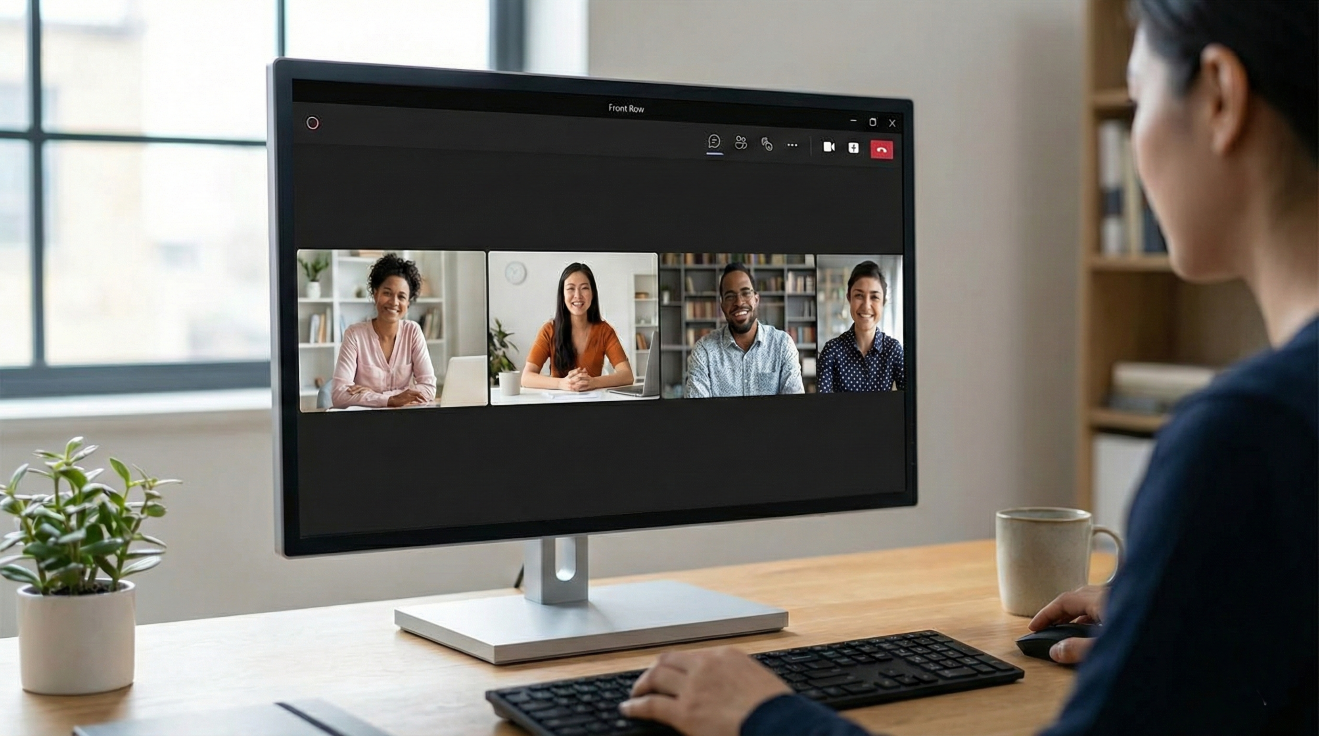
Front Row changes this dynamic by placing remote participants along the bottom of the display, aligning them visually with the in-room attendees. The layout also integrates shared content, meeting chat, raised hands, and live reactions — creating a richer sense of presence.
In theory, this brings everyone to the same “eye level”, encouraging more natural interaction and better meeting equity. When paired with the right camera and display setup, it can make virtual collaboration feel far less virtual.
When the Front Row Layout Shines
1. Medium to Large Meeting Rooms
Front Row thrives in spaces where people sit facing a large display — think executive boardrooms or project spaces equipped with wide-format screens. The panoramic layout takes advantage of horizontal real estate, ensuring remote participants are clearly visible and the meeting feels balanced.
It’s especially effective in Microsoft Teams Rooms environments that use intelligent cameras capable of framing individuals rather than the group as a whole. This combination makes hybrid meetings more human, reducing the divide between in-room and remote participants.
2. Collaborative or Creative Sessions
In sessions where visuals and discussion flow together — brainstorming, design reviews, or product showcases — Front Row excels. By embedding shared content alongside participant video, it allows in-room attendees to glance naturally between slides and faces without losing connection to either.
3. Inclusive Hybrid Meetings
When paired with captioning and accessibility tools, Front Row helps ensure every participant can engage fully. The layout’s integrated view supports features like live captions, transcription, and reactions — promoting accessibility and a sense of belonging.
For organisations investing in Microsoft’s Teams implementation and room integration, Front Row can be a strong component of a wider hybrid strategy that prioritises inclusivity and usability.
When the Front Row Layout Falls Short
1. Small or Narrow Rooms
While Front Row looks impressive on paper, its widescreen design doesn’t always translate well to compact or narrow spaces. When screens are too small or participants sit too close, the layout can feel cluttered — faces shrink, text becomes harder to read, and the balance between content and video gets lost.
In such cases, a more traditional gallery or content-focused layout may actually deliver a clearer, more comfortable viewing experience.
2. Rooms Without Proper Audio-Visual Calibration
Front Row’s success depends heavily on camera height and placement. If your camera sits too high above the display, the intended eye-level illusion breaks — remote participants end up “looking” over the heads of those in the room rather than meeting their gaze.
Microphone placement is just as crucial. Because Front Row encourages more open conversation between in-room and remote users, poor acoustics or misaligned audio pickup can lead to awkward delays and missed dialogue.
(If you’ve ever wondered why some Teams rooms sound crisp while others echo, our discussion on the challenges of video conferencing sheds light on these technical pitfalls and how to overcome them.)
3. Inflexible Room Configurations
Some organisations rush to deploy Front Row across all rooms without considering the diversity of their spaces. However, not every environment benefits equally. Boardrooms with fixed furniture, tiered seating, or off-centre displays may not align with the Front Row visual structure, leaving the experience feeling uneven.
The most effective hybrid strategies treat Front Row as one option in a toolkit — not a one-size-fits-all default.
Designing Rooms for Front Row Success
To get the most from Front Row, your room design should enhance, not compete with, the layout’s goals. Here are a few practical principles to guide your setup:
1. Screen Placement and Size
Front Row works best with 21:9 ultra-wide displays or dual-screen setups. The goal is to keep participants visible at a life-like scale without crowding content. If your organisation primarily uses 16:9 screens, consider installing dual displays to separate video from content while maintaining balance.
2. Camera Alignment
Mount your camera as close to screen eye level as possible — ideally centred horizontally with the bottom row of remote participants. This reinforces natural sightlines and reduces the “looking up or down” effect.
3. Audio Calibration
If your meeting rooms experience echo or reverb, acoustic treatment and microphone zoning can make a huge difference. Combining beamforming microphones with proper sound absorption helps maintain clarity and confidence for all participants.
4. Flexible Layouts
Front Row should be part of a broader Microsoft Teams implementation plan that accommodates different room types. From small huddle spaces to training rooms, flexibility is key. Consider pairing Front Row with simpler layouts in smaller environments to avoid visual overload.
Front Row and the Bigger Picture
Front Row isn’t just a layout — it’s part of Microsoft’s broader vision for hybrid collaboration and meeting equity. It complements other tools and intelligent room features that make meetings more engaging and inclusive.
For organisations already using Microsoft 365, it’s worth exploring how Front Row fits into the tools you may already have access to. Many businesses overlook valuable integrations that can elevate their meeting experience. You might find inspiration in how companies are using underutilised Microsoft 365 tools to enhance productivity and communication.
By pairing layout design with strategic technology adoption, hybrid meetings can evolve from functional to frictionless.
Where to Go from Here
Front Row represents Microsoft’s most ambitious effort yet to reimagine how hybrid meetings look and feel. When thoughtfully implemented, it delivers a genuine sense of connection between in-room and remote participants. But without the right room design, AV setup, and user understanding, it can fall short of its potential.
At Bridgehampton, we help organisations design, implement, and optimise Microsoft Teams Rooms that work for real people — not just technology. From assessing existing setups to building future-ready collaboration spaces, our approach ensures every meeting layout enhances productivity and inclusivity.
If your team is exploring how to bring Front Row to life, or how to make the most of your Microsoft investment, our experts are ready to help you turn potential into performance.